

DrutPDF PDF Viewer & Editor
DrutPDF PDF Viewer & Editor

100% offline, privacy-first workflow
Convert to/from PDF
Compress & optimize PDFs



Key Features of DrutPDF PDF Viewer & Editor
Transform your experience with DrutPDF PDF Viewer & Editor's main features.
100% offline, privacy-first workflow
All PDF viewing, editing, and file operations run fully on-device, so your documents never need to be uploaded to external servers or the cloud.
Explore features and benefits.
Experience innovation at hand.
Download and start using.
Convert to/from PDF
Create clean PDFs from gallery images or camera photos, convert web pages to PDF, and export PDF pages back into high-quality PNG/JPG images.
Improved performance and stability.
Regular software updates.
Enhanced user experience.
Why choose DrutPDF PDF Viewer & Editor
Streamline your life with DrutPDF PDF Viewer & Editor today!

Compress & optimize PDFs
Instantly shrink large PDF files to save storage and make sharing (email/text) faster without unnecessary quality loss.

Merge, split, reorder & delete pages
Organize documents by combining multiple PDFs, splitting by page range, removing unwanted pages, and visually reordering page layouts.

Sign & flatten documents
Draw and place signatures directly onto PDFs, then flatten the file to lock changes and reduce the risk of later tampering.
Reviews about DrutPDF PDF Viewer & Editor
Discover our users' feelings and comments.
I've been using DrutPDF PDF Viewer & Editor for a while, and it’s amazing! The design is intuitive, and the features work seamlessly.

User 1
Jul 18, 2026
I can't get enough of DrutPDF PDF Viewer & Editor! It’s fun and engaging. It’s worth every download!
User 2
Jul 7, 2026
DrutPDF PDF Viewer & Editor has greatly enhanced my experience. The performance is top-notch. Five stars from me!
User 3
Jun 23, 2026
More Apps like DrutPDF PDF Viewer & Editor
Discover your next favorite app today!

FAQs about DrutPDF PDF Viewer & Editor
Browse the most frequently asked questions that you may interested in.
Does DrutPDF work offline, or does it upload my PDFs to the cloud?
DrutPDF is designed to be privacy-first and works 100% offline for its document operations—your files stay on your Android device and don’t need to be sent to external servers or the cloud.
What file operations can I do with DrutPDF besides viewing PDFs?
DrutPDF includes an all-in-one toolkit: compress PDFs, merge files, split PDFs by page range, delete pages, reorder pages, convert images to PDF, export PDF pages to PNG/JPG, add watermarks, insert page numbers, edit PDF metadata (Title/Author/Subject), and extract selectable text from PDF pages.
Can I sign documents in DrutPDF?
Yes. DrutPDF lets you draw and place signatures onto documents, and it also supports flattening the file to lock the edits and help prevent future tampering.
Can DrutPDF password-protect or unlock PDFs?
Yes. It supports securing PDFs with AES-256 password encryption and can also remove/strip passwords from PDFs when you’re authorized to do so.
Can DrutPDF edit the actual text content inside a PDF?
Not as a core feature. According to the provided FAQ example, the app primarily focuses on viewing, annotating, and managing PDFs rather than direct in-place text editing of PDF content.
Does DrutPDF support filling PDF forms?
Yes. The official site states it can fill interactive forms.
Does DrutPDF have a dark mode?
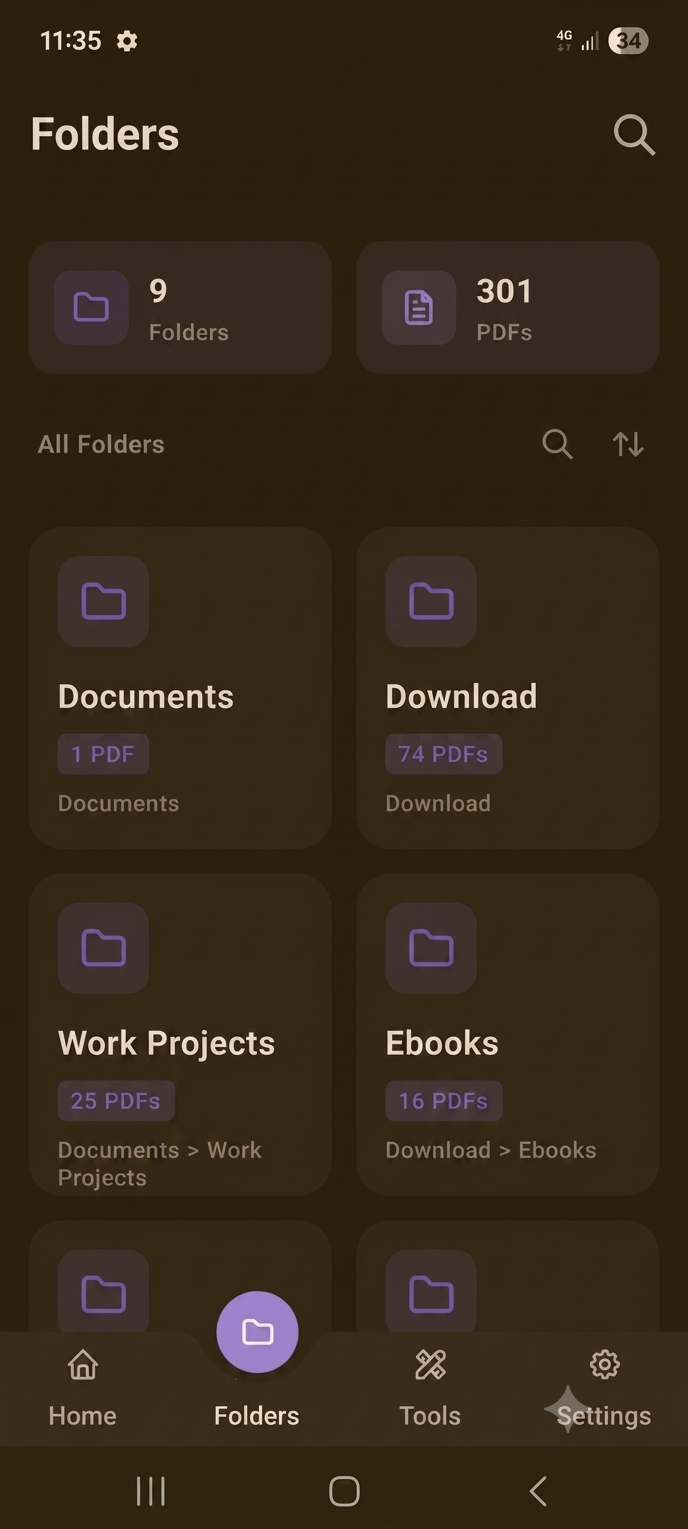
Yes. The official site highlights a Dark Mode UI with a modern Material Design interface.
Is DrutPDF free to use?
It offers a range of features for free, but some advanced features or functionalities may require a premium subscription (per the provided FAQ example).
Start your free trial for DrutPDF PDF Viewer & Editor today!
Enjoy your everyday with DrutPDF PDF Viewer & Editor.
Let's keep in touch!
Subscribe to our newsletter for the latest news and updates.
By subscribing, you agree to DrutPDF PDF Viewer & Editor Privacy Policy.